# 🎵 Html5 Full Page Internet Radio Player
A modern, responsive web-based radio player with a beautiful interface. Stream your favorite radio station with real-time song information, lyrics, and playback history.
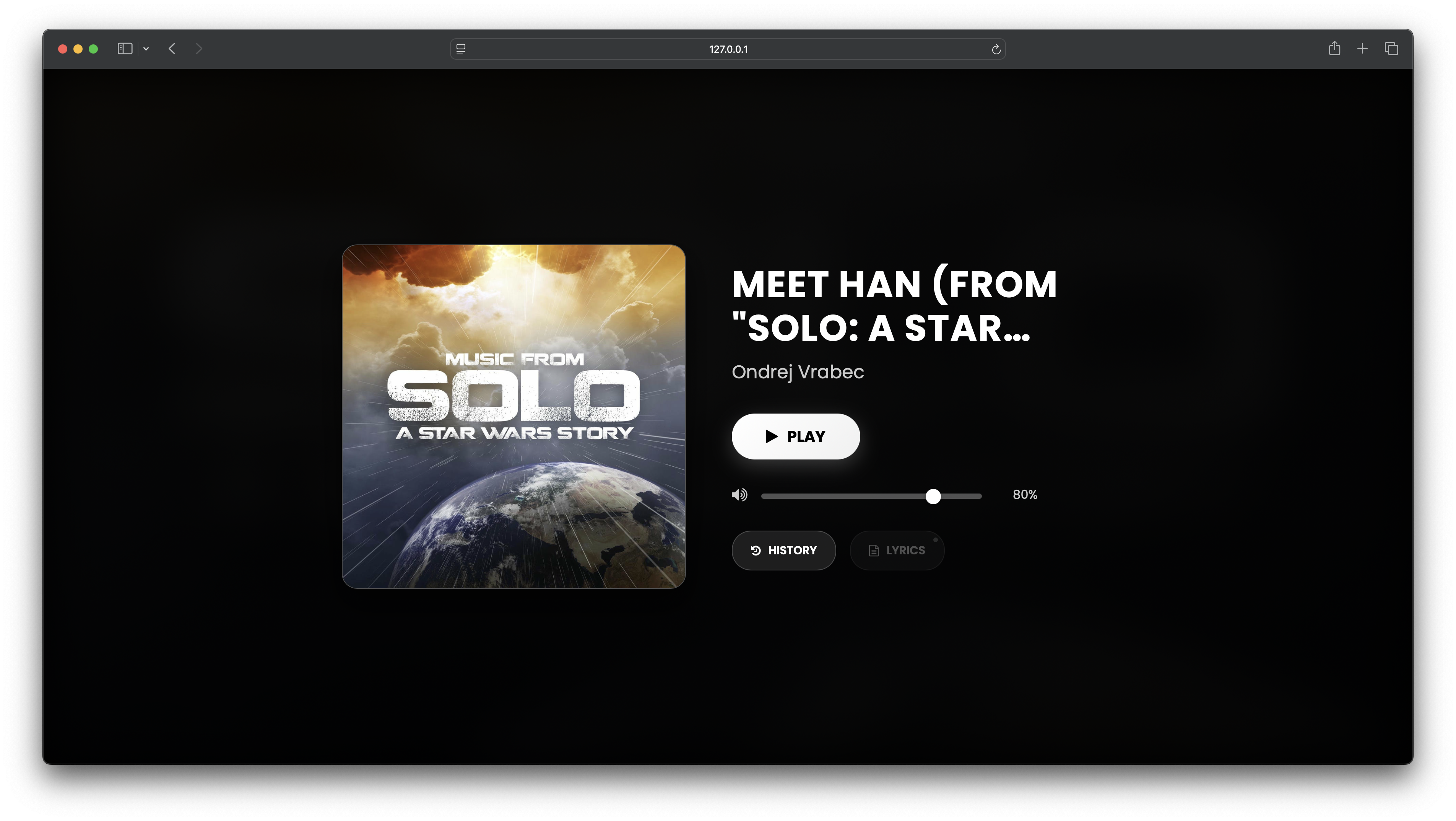
## ✨ Features
- **🎧 Live Streaming**: Supports multiple streaming protocols (Icecast, Zeno, Shoutcast, Radiojar)
- **🎨 Modern UI**: Spotify-inspired interface with smooth animations
- **📱 Responsive Design**: Works perfectly on desktop, tablet, and mobile devices
- **🎵 Real-time Metadata**: Displays current song, artist, and album artwork
- **📜 Lyrics Integration**: Displays lyrics of the currently playing song.
- **📚 Playback History**: Shows up to 5 recently played songs
- **🎛️ Volume Control**: Precise volume control with keyboard shortcuts
- **⌨️ Keyboard Shortcuts**: Full keyboard navigation support
## 🔌 Supported APIs
This radio player supports integration with multiple radio streaming APIs through [RadioAPI.me](https://radioapi.me):
- **Azuracast API** - Open-source radio broadcasting suite
- **Live365 API** - Professional internet radio platform
- **RadioKing API** - European radio streaming service
## 📡 Supported Stream Types
This radio player supports various streaming protocols and platforms:
- **Icecast** - Open-source streaming media server
- **Shoutcast** - Nullsoft's streaming media server
- **Zeno** - Modern streaming platform
- **Radiojar** - Cloud-based radio streaming
- **HTTP/HTTPS Streams** - Direct audio stream URLs
Get detailed song information from multiple music platforms:
- **iTunes (Apple Music)** - Apple's music catalog
- **Spotify** - World's largest music streaming platform
- **YouTube Music** - Google's music streaming service
- **Deezer** - French music streaming service
- **KKBOX** - Asian music streaming platform
- **Line Music** - Japanese music streaming service
- **FLOMusic** - Korean music streaming platform
## 🚀 Quick Start
1. **Clone the repository**
```bash
git clone https://github.com/joeyboli/radioplayer.git
cd radioplayer
```
2. **Configure your radio stream**
- Open `js/script.js`
- Update the `URL_STREAMING` constant with your stream URL
- Get your API endpoint from [RadioAPI.me](https://radioapi.me)
3. **Open in browser**
```
Open index.html in your browser
```
## ⚙️ Configuration
Edit `js/script.js` to configure your radio stream:
```javascript
const URL_STREAMING = "https://your-stream-url.com/stream"
const API_URL = "https://prod-api.radioapi.me/streamtitile/STREAM_ID"
```
## 🎮 Keyboard Shortcuts
| Key | Action |
|-----|--------|
| `Space` or `P` | Play/Pause |
| `↑` | Volume Up |
| `↓` | Volume Down |
| `M` | Mute/Unmute |
| `0-9` | Set volume to 0-90% |
## 🎨 Customization
To change the number of history items displayed, edit `js/script.js` and modify the `HISTORY_ITEMS_COUNT` constant.
## 📱 Browser Support
- ✅ Chrome 60+
- ✅ Firefox 55+
- ✅ Safari 12+
- ✅ Edge 79+
## 🌐 API Integration
This player uses [RadioAPI.me](https://radioapi.me) for metadata and its lyrics. Get your API endpoint from their service.
## 🐛 Troubleshooting
- Check browser console for errors
- Verify stream URL is accessible
- Ensure API endpoint is working
## 📄 License
GNU AFFERO GENERAL PUBLIC LICENSE